

VPNs are essential for privacy, security, and accessing content worldwide, but many users experience the same frustration: a VPN that feels lightning-fast one day and unbearably slow the next.
Slow VPN performance can ruin streaming, gaming, video calls, or even simple browsing. Fortunately, speed drops are not permanent, and in most cases, they’re caused by identifiable issues that can be resolved.
Below, we’ll dive into the 7 most common reasons why VPNs slow down and provide practical solutions so you can enjoy smooth, secure, and fast internet.
How to Test the Speed of Your VPN
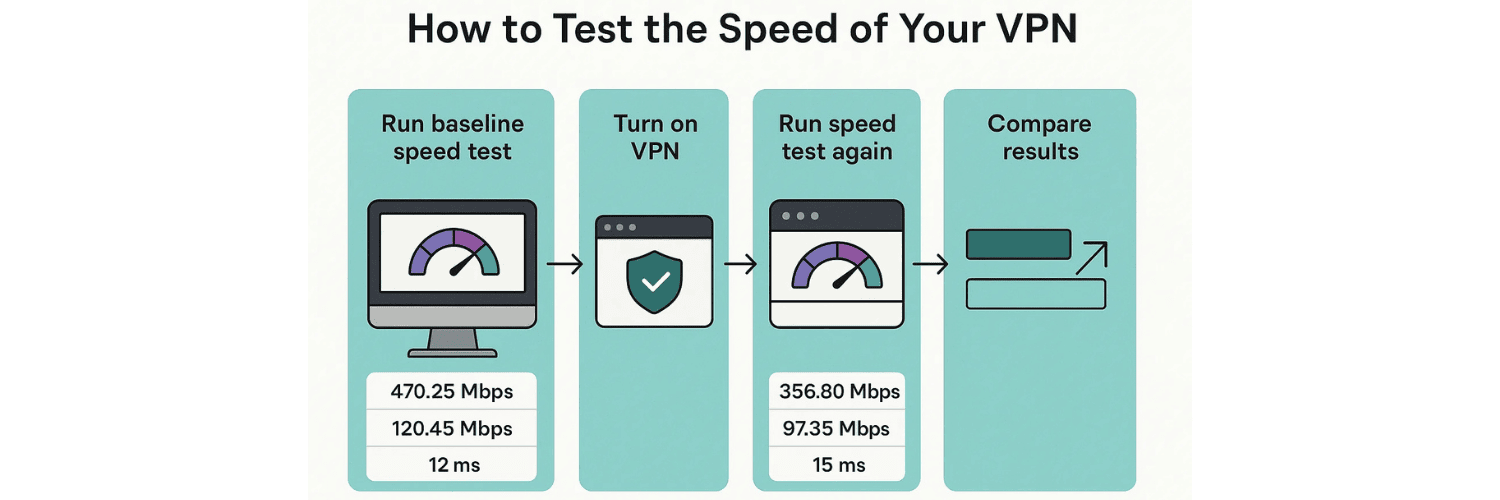
Testing your VPN speed is simple and helps you understand whether slow performance comes from your VPN or your base internet connection. Start by running a baseline speed test with your VPN turned off, using a tool like Speedtest.net or Fast.com. This gives you your normal download, upload, and ping values. Next, turn on your VPN and connect to the server of your choice. Run the same speed test again and compare the results. A small drop in speed (10–20%) is normal due to encryption, but if you notice a significant slowdown (50% or more), try switching to a closer server, using a faster protocol like WireGuard, or testing at a different time of day. Regular testing ensures you always know how your VPN is performing and helps you choose the best setup for smooth browsing, streaming, and gaming.
Top Factors That Reduce VPN Speed
1. Server Distance Is Too Far
When you connect to a VPN, your internet traffic travels through a secure server before reaching its destination. The farther away this server is, the longer the data journey, which increases latency (delay) and decreases download/upload speeds.
For example, if you’re in the UK and connect to a VPN server in Australia, your data travels halfway across the globe, which inevitably slows things down.
Fix:
Choose a server closer to your physical location for general browsing or work.
Only connect to distant servers if you specifically need to access region-locked content.
Many VPN apps offer a “Best Server” or “Fastest Server” option that automatically connects you to the optimal location.
2. Overcrowded VPN Servers
VPN servers have limited bandwidth, and when too many users connect to the same server, speeds drop for everyone. This is common during peak hours (evenings and weekends) when people stream, game, or download files.
Imagine a crowded highway at rush hour—too much traffic slows everyone down. The same happens with VPN servers.
Fix:
Switch to a different server, ideally one with a lower user load.
Many VPNs display server usage statistics—pick a server under 50% load.
Premium VPN providers often have thousands of servers to distribute traffic, while free VPNs typically suffer the most from congestion.
3. Slow Internet Connection (Base Speed)
Your VPN performance can never exceed your base internet speed. If your ISP plan is already slow, adding VPN encryption will make it feel worse.
For example, if your non-VPN speed is only 10 Mbps, turning on a VPN may reduce it to 7–8 Mbps, which is fine for browsing but not great for HD streaming or gaming.
Fix:
Run a baseline speed test without the VPN active.
If your base speed is already poor, consider upgrading your internet plan.
Close background apps (like cloud syncing or large downloads) that consume bandwidth before using your VPN.
4. Inefficient VPN Protocol
A VPN protocol determines how your connection is encrypted and transmitted. Some protocols are fast but less secure, while others prioritize security at the cost of speed.
For instance, WireGuard is lightweight, modern, and extremely fast. On the other hand, OpenVPN TCP is very secure but slower. If your VPN automatically switches between protocols, your speed may fluctuate.
Fix:
Switch to WireGuard for the best balance of speed and security.
Use OpenVPN UDP instead of TCP if you prefer faster performance.
On mobile devices, IKEv2 is excellent because it handles network changes (like Wi-Fi to mobile data) without dropping speed.
5. Wi-Fi Interference
Wi-Fi connections are convenient but unstable. Interference from walls, electronic devices, or other nearby Wi-Fi networks can slow your speed before the VPN even gets involved.
This issue is more noticeable in apartments, coffee shops, or airports where dozens of users are sharing the same wireless spectrum. VPN encryption magnifies these weaknesses, making performance feel even worse.
Fix:
Use a wired Ethernet connection whenever possible for stable speeds.
If you must use Wi-Fi, position yourself closer to the router.
Upgrade to a dual-band or mesh Wi-Fi system to reduce interference.
6. ISP Throttling
Some Internet Service Providers (ISPs) intentionally slow down certain types of traffic, like streaming, torrenting, or gaming, to manage network load. This is known as throttling.
While a VPN can often bypass throttling by hiding your activity from your ISP, in rare cases the ISP may target VPN traffic itself, which can lead to speed drops.
Fix:
Test your speed with and without the VPN. If the VPN is faster, throttling was likely the issue.
If speeds are worse with the VPN, try switching servers or protocols.
Use a VPN with obfuscation features that disguise VPN traffic as normal browsing to avoid ISP detection.
7. Device or Router Limitations
VPNs require processing power to encrypt and decrypt traffic. On modern devices, this overhead is minimal, but older laptops, smartphones, or basic routers may struggle, leading to unstable speeds.
For example, if you’re running a VPN on a low-end smartphone while streaming video and multitasking with several apps, performance may suffer.
Fix:
Close unnecessary apps running in the background.
Update your router’s firmware and VPN app to the latest version.
Consider upgrading to a VPN router or a modern device with better processing power if you use VPNs heavily.
Additional Tips to Improve VPN Speed

Restart your router and device to clear cache and congestion.
Keep your VPN app updated for new optimizations.
Use split tunneling to send only necessary traffic through the VPN.
Try different servers until you find the best-performing one for your needs.
Conclusion
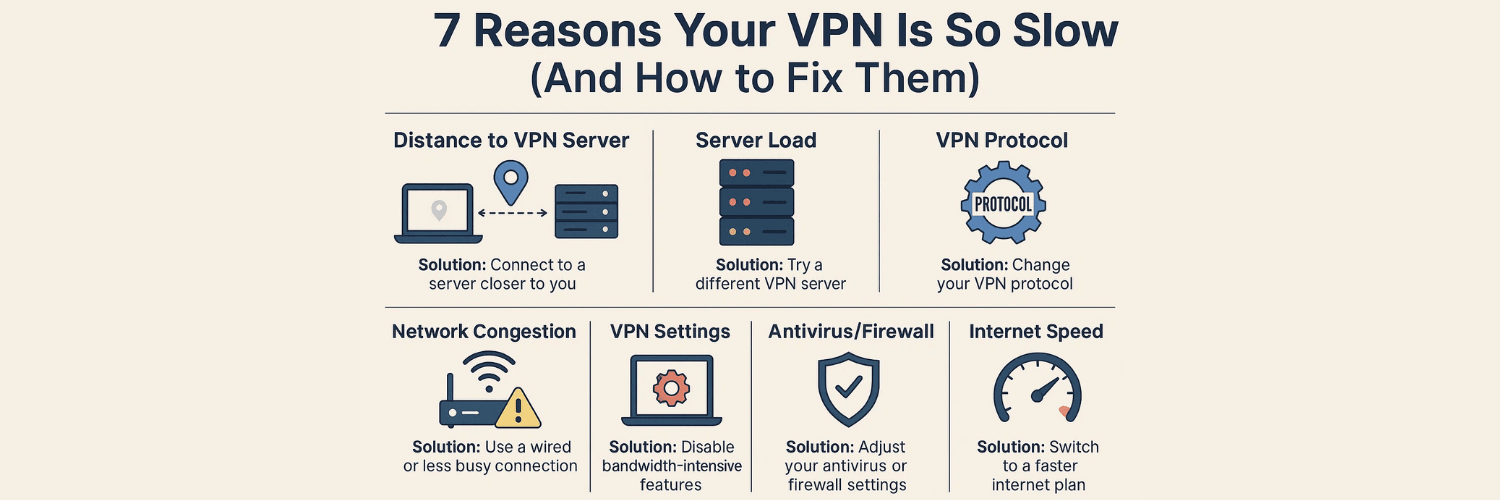
A slow VPN can feel frustrating, but in most cases, the cause is easy to identify. By understanding the 7 key reasons—server distance, congestion, base speed, protocol choice, Wi-Fi interference, ISP throttling, and device limitations—you can take targeted steps to improve performance.
With the right fixes, you can enjoy the benefits of a VPN—privacy, security, and unrestricted access—without sacrificing speed.
FAQs: Why Is My VPN Slow?
1. Does a VPN always slow down the internet?
A VPN usually causes a small drop in speed due to encryption, but a good VPN shouldn’t ruin your browsing or streaming experience.
2. How much speed loss is normal with a VPN?
A 10–20% drop is typical. Anything above 50% means it’s time to troubleshoot.
3. Which VPN protocol is fastest?
WireGuard is the fastest protocol available today, followed by OpenVPN UDP and IKEv2.
4. Why is my VPN fast sometimes but slow at other times?
This usually comes down to server congestion and peak internet usage times.
5. Can a VPN improve my internet speed?
Yes, if your ISP throttles certain traffic, a VPN can bypass those restrictions and provide faster performance.
6. Why is my VPN slower on Wi-Fi than Ethernet?
Wi-Fi is prone to interference. Ethernet is always more stable and faster.
7. How can I check if my ISP is throttling me?
Run multiple speed tests with and without the VPN. If speeds drop only for certain activities (like streaming), throttling is likely.
8. Do free VPNs affect speed more than paid ones?
Yes. Free VPNs often have fewer servers, overcrowding, and bandwidth limits, making them much slower.
9. Why does my VPN slow down on mobile data?
Mobile networks fluctuate more than broadband, especially when switching between 4G, 5G, or weak coverage areas.
10. What’s the easiest fix for a slow VPN?
Connect to a closer, less crowded server, switch to WireGuard, or restart your router/device.
Related links
VPN Speed Fluctuations: Why Your VPN Is Fast One Day and Slow the Next
How to Speed Up Your VPN: Settings, Tools, and Tricks That Work
VPN Protocols Compared by Speed: WireGuard vs OpenVPN vs IKEv2
How VPN Speed Tests Work: Ping, Download, Upload, and Jitter Explained
Why VPNs Slow You Down: Encryption, Routing, and Server Load
VPN Speed vs Security Trade-Off: Finding the Sweet Spot
Tags

About VPNTest
Content Specialist with expertise in cybersecurity and online privacy. Sarah has been testing and reviewing VPN services for over 5 years and regularly contributes to leading tech publications.
View all articles by VPNTest →




Never Miss an Article
Subscribe to our newsletter to receive the latest VPN guides, security tips, and industry news directly in your inbox.