


Balancing VPN speed and security remains one of the most persistent challenges for advanced users. Strong encryption, multi-hop routing, and robust privacy protocols deliver airtight protection but often at the expense of raw performance. Conversely, lightweight tunneling protocols like WireGuard or IKEv2 provide near-native speeds but may not always meet the highest thresholds of anonymity or resistance against sophisticated surveillance. This trade-off becomes even more pronounced when factoring in server distance, load balancing, and real-world usage scenarios such as 4K streaming, competitive gaming, or enterprise-grade data transfers.
Finding the sweet spot requires a technical understanding of how VPN protocols, encryption levels, and server infrastructure impact both speed and security. Advanced users can optimize their experience by tailoring configurations—such as selecting efficient ciphers, tuning MTU/MSS values, enabling split tunneling, and leveraging modern protocols—while still maintaining sufficient cryptographic strength for their threat model. By aligning security needs with performance goals, it is possible to build a VPN setup that minimizes latency and bandwidth loss without compromising core privacy.
How does encryption level impact VPN speed?
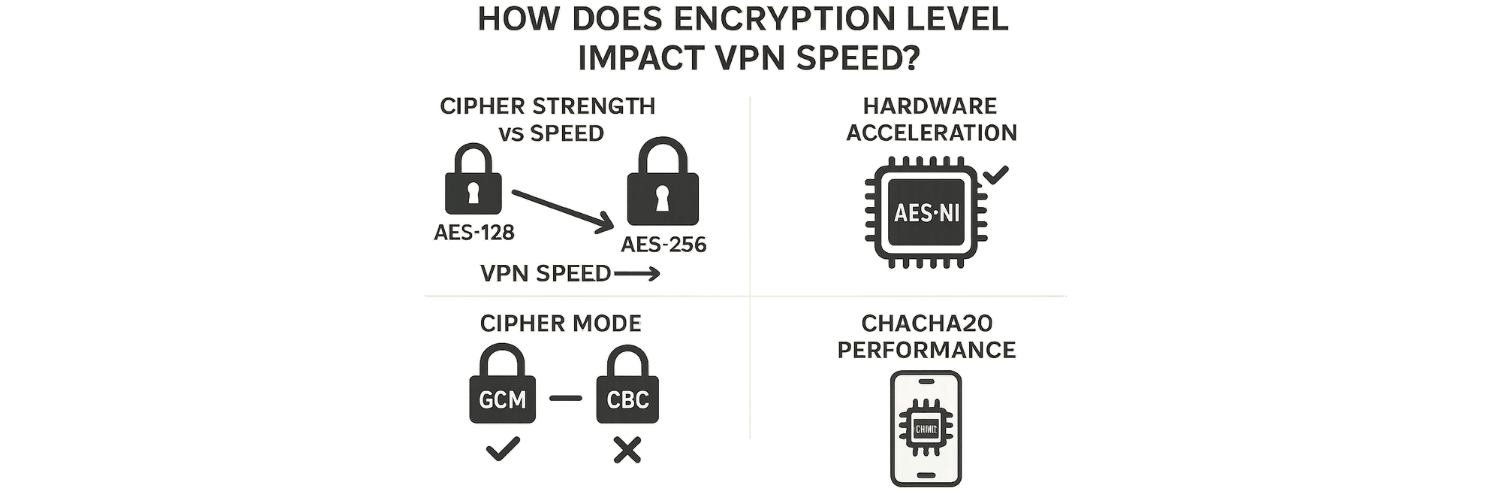
Encryption inherently adds computational overhead, so higher-strength ciphers and longer keys consume more CPU cycles. For example, using AES-256 instead of AES-128 typically incurs roughly a 10–15% throughput penalty on devices without hardware acceleration. Modern CPUs with AES-NI can nearly eliminate this gap, but on older or low-power hardware (like routers or smartphones) the extra encryption work can significantly reduce throughput. Likewise, cipher mode matters: AES-GCM (with built-in authentication) often outperforms AES-CBC because it avoids separate HMAC processing. In contrast, ChaCha20-Poly1305 (used by WireGuard and some TLS setups) is a stream cipher optimized for software; it outpaces AES on CPUs lacking AES-NI. In short, stronger encryption (longer keys, more complex algorithms) generally means more CPU overhead and lower VPN speed. The trade-off is striking the fastest cipher that still meets your privacy needs (e.g. AES-128 or ChaCha20 for speed, AES-256 for maximum security).
Cipher strength vs speed: AES-256/CBC or large DH/ECDH keys add CPU work (slowing throughput) compared to AES-128 or ChaCha20.
Hardware acceleration: Enable AES-NI or ARM crypto extensions if available to offload encryption and regain speed.
Cipher mode: Prefer authenticated ciphers (GCM) to reduce overhead; CBC modes require extra padding/HMAC.
ChaCha20 performance: On devices without AES-NI, ChaCha20-Poly1305 can be notably faster than AES, with comparable security.
Handshake overhead: Modern VPNs use fast key-exchange (ECDH/DH). The one-time handshake cost is negligible compared to the continuous cost of bulk encryption.
Are all VPN protocols equally secure and fast?
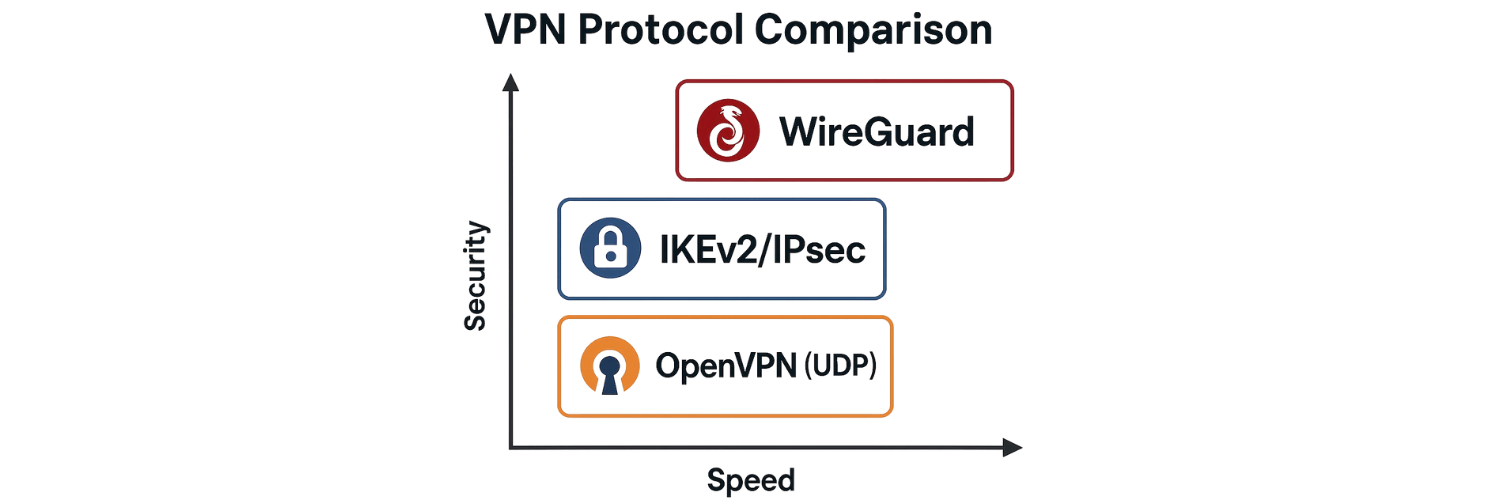
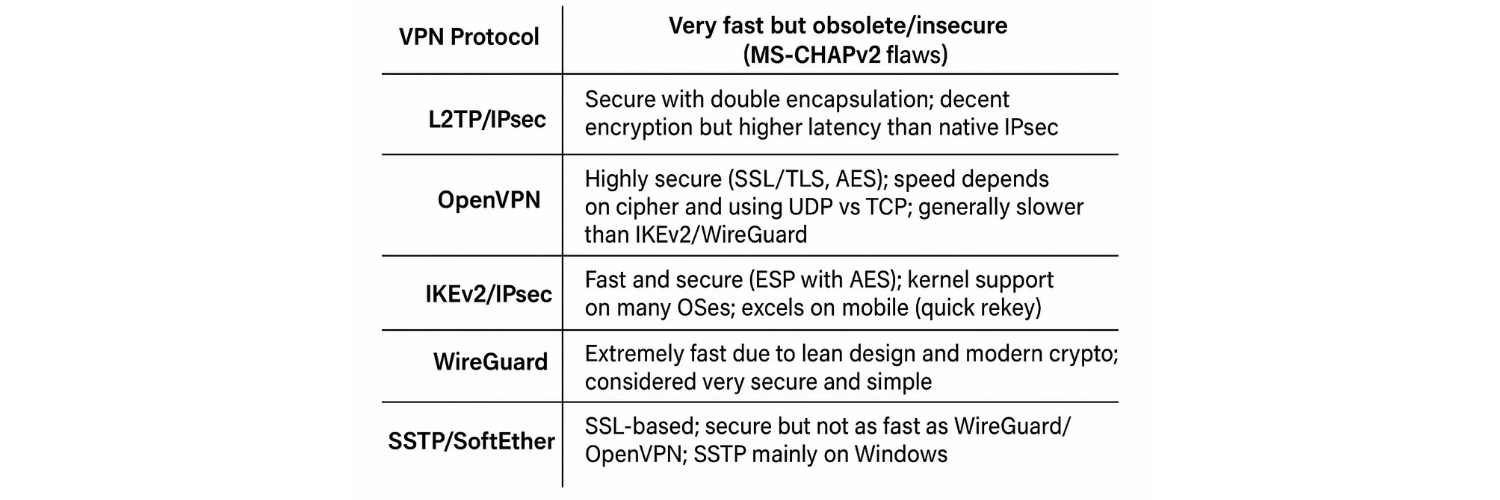
No – VPN protocols differ greatly. PPTP (a legacy Microsoft protocol) is extremely fast but now considered insecure (due to broken MS-CHAPv2 authentication). L2TP/IPsec adds double encapsulation (L2TP tunnel + IPSec encryption), making it more secure than PPTP but also slower due to extra headers. In contrast, IKEv2/IPsec (RFC 7296) is both secure and efficient: it uses strong ciphers (AES, AES-GCM) and is optimized for quick rekeying and mobility, so it reconnects fast on flaky connections. OpenVPN (SSL/TLS-based) is very secure thanks to mature OpenSSL ciphers, but as a user-space implementation it has moderate overhead; it can use UDP (for speed) or TCP (for reliability). WireGuard (RFC 8992) is built with modern crypto (ChaCha20, Curve25519) and a minimal codebase. Benchmark tests often show WireGuard far outpacing OpenVPN throughput on the same hardware. Other options: SSTP (Windows SSL VPN) is secure but relatively slow, and SoftEther can be fast using its own SSL-based protocols but is less common. In summary, protocols like PPTP/L2TP sacrifice security for speed and are generally discouraged, whereas WireGuard, IKEv2, and OpenVPN offer strong encryption – with WireGuard and IKEv2 typically delivering the highest speeds.
PPTP: Very fast but obsolete/insecure (MS-CHAPv2 flaws).
L2TP/IPsec: Secure with double encapsulation; decent encryption but higher latency than native IPsec.
OpenVPN: Highly secure (SSL/TLS, AES); speed depends on cipher and using UDP vs TCP; generally slower than IKEv2/WireGuard.
IKEv2/IPsec: Fast and secure (ESP with AES); kernel support on many OSes; excels on mobile (quick rekey).
WireGuard: Extremely fast due to lean design and modern crypto; considered very secure and simple.
SSTP/SoftEther: SSL-based; secure but not as fast as WireGuard/OpenVPN; SSTP mainly on Windows.
Which protocols (e.g. WireGuard, OpenVPN, IKEv2) provide the best balance?
For most users, WireGuard and IKEv2/IPsec strike the best balance between speed and security. WireGuard’s slim codebase and ChaCha20 encryption yield throughput that often nears the raw network speed. It is implemented in the kernel (on Linux) which minimizes context-switch overhead. Many real-world tests show WireGuard connections saturating multi-hundred-Mbps links with ease, significantly outperforming OpenVPN in similar conditions. IKEv2/IPsec is also very efficient: it typically uses AES-GCM or ChaCha20, benefits from hardware acceleration, and maintains high throughput. Its support for MOBIKE (fast rekey) makes it ideal for mobile scenarios without sacrificing speed. OpenVPN (especially over UDP with AES-128-GCM) remains secure, but will usually lag behind these newer protocols in raw performance. In practice, many providers now default to WireGuard for speed; IKEv2 is a solid alternative, especially on platforms where WireGuard isn’t available. Users should choose the fastest modern protocol their device supports (commonly WireGuard or IKEv2) and use strong-but-efficient ciphers (e.g. AES-128-GCM or ChaCha20) for optimal balance.
WireGuard: Best-in-class throughput. Minimal handshake overhead and modern crypto make it extremely fast. Great choice if supported.
IKEv2/IPsec: Nearly as fast on modern hardware (often hardware-accelerated); stable and secure. Good default for mobile/security.
OpenVPN (UDP): Very secure and reliable. With AES-128/GCM or ChaCha20, it’s fast enough for most uses, but generally slower than WireGuard.
AES-128 vs AES-256: For high speed, AES-128 or ChaCha20 is preferred; for ultimate security, use AES-256 (10–15% throughput hit).
UDP vs TCP: Use UDP mode whenever possible to avoid extra latency and handshake duplication inherent in TCP-over-VPN.
How to reduce speed loss while maintaining privacy?
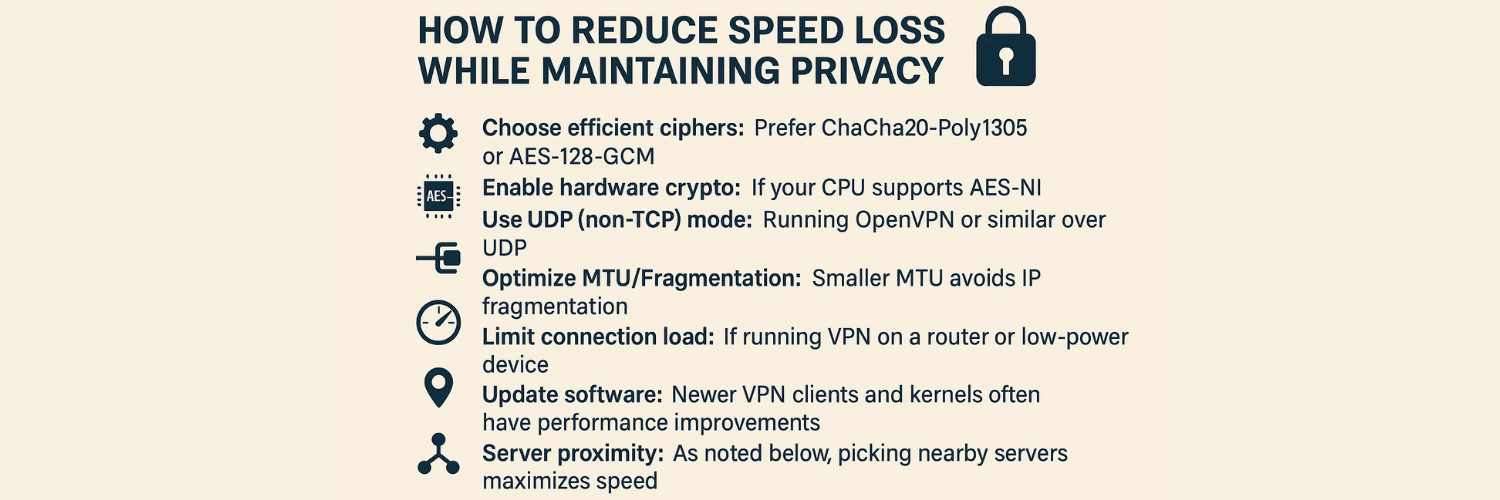
You can tweak several factors to boost VPN speed without compromising much privacy:
Choose efficient ciphers: Prefer ChaCha20-Poly1305 or AES-128-GCM for strong encryption with minimal CPU cost. These provide confidentiality and integrity but encrypt blocks faster than older modes.
Enable hardware crypto: If your CPU supports AES-NI, ensure the VPN software uses it to offload encryption. Routers or devices with crypto-accelerators can handle VPN encryption at near line-rate.
Use UDP (non-TCP) mode: Running OpenVPN or similar over UDP avoids extra ACKs and retransmission overhead; this yields better throughput. (TCP-over-VPN can suffer “TCP meltdown” when both inner and outer channels use TCP.)
Optimize MTU/Fragmentation: Smaller MTU avoids IP fragmentation which can degrade speed. Many VPN clients auto-adjust MTU.
Limit connection load: If running VPN on a router or low-power device, limit the number of simultaneous tunnels or devices to prevent CPU overloading.
Update software: Newer VPN clients and kernels often have performance improvements (e.g. multi-threaded encryption, better network stacks).
Server proximity: As noted below, picking nearby servers maximizes speed.
Split tunneling (if acceptable): Route only sensitive traffic through VPN (see next section). This greatly cuts the VPN workload.
For example, switching OpenVPN to AES-GCM/UDP and enabling AES-NI can easily double the throughput compared to AES-CBC/TCP. Always test different cipher suites and server locations to find the fastest secure configuration for your setup.
When should I use strong encryption versus faster settings?
It depends on your threat model and application:
High-security needs: For banking, confidential work or sensitive communications, use strongest encryption (AES-256 or ChaCha20) and top-grade protocols (OpenVPN/IKEv2 with GCM, RSA-4096/ECDH). Regulations or compliance (e.g. government, corporate) may mandate AES-256. Despite the speed cost, it ensures maximum confidentiality.
Everyday/bandwidth-critical use: For routine browsing, streaming or gaming on trusted networks, you can favor speed. AES-128 or ChaCha20 with WireGuard/IKEv2 provides excellent security with higher throughput. NIST and many experts consider AES-128 secure for the foreseeable future, so it’s a good “sweet spot.”
Mobile/low-power devices: To save battery and CPU, use the lighter cipher (ChaCha20 on devices without AES-NI) or AES-128. Many mobile VPN apps default to IKEv2 or WireGuard for their efficiency.
Trusted vs untrusted networks: In an already-secure LAN (home VPN server, or wired office network), ultra-strong encryption may be unnecessary. On public Wi-Fi or untrusted ISP networks, lean toward stronger settings.
Legacy hardware: If older routers/phones struggle with AES-256, drop to AES-128 or ChaCha20. Even AES-128 is considered “military grade” for most attackers.
Layered security: If you’re using additional layers (SSL/TLS tunnels, SSH, Tor, etc.), you might accept slightly weaker VPN encryption because privacy is already layered.
In practice, many users run AES-128-GCM (or ChaCha20) by default and only switch to AES-256 when handling critical data. Always balance privacy needs against measurable speed: if you’re on a 100 Mbps link, losing 10–15% for AES-256 may be acceptable for peace of mind.
What is split tunneling and selective encryption for performance?
Split tunneling lets you exclude non-critical traffic from the VPN. For example, you could route only corporate or PII-related traffic through the VPN while sending streaming or gaming data directly to the Internet. This reduces the volume of encrypted packets, boosting speed for the tunneled traffic. Many VPN clients (Windows, Linux iptables, routers) allow you to specify which IP ranges, interfaces, or applications use the VPN. In essence, you “split” your workload: sensitive data remains protected, while other data goes untunneled for performance.
Selective encryption is a similar concept: it encrypts only specific packets (by port or protocol) instead of everything. It’s rarer to implement, but it can further optimize performance if, for example, only certain applications need VPN privacy.
Advantages: In real-world use, split tunneling can greatly improve responsiveness. For instance, you might stream Netflix at full ISP speed while your browser traffic goes through the VPN. This is especially useful on limited-bandwidth connections.
Risks: Any data sent outside the tunnel is visible to your ISP/local network. So only use split tunneling for truly non-sensitive activities. On a home network it’s generally safe; on a public Wi-Fi, it might expose your apps.
Example: A corporate VPN might let internal email/data go through the tunnel, while letting your home NAS or printer traffic stay local.
Configuration: Windows built-in VPN settings and many third-party apps (e.g. OpenVPN config) allow split-tunnel rules. On Linux, firewall rules (ip route, iptables) can implement selective VPN routing.
Selective use-case: Gamers sometimes split-tunnel voice chat (VoIP) outside the VPN to reduce lag, or peer-to-peer file transfers outside if they only want their web browsing anonymized.
In short, split tunneling is a powerful way to reduce VPN load and speed up important traffic, but it sacrifices the complete privacy of “all or nothing” encryption.
How do VPN server distance and load affect performance?
Physical distance has a direct impact on latency and throughput. Every additional 100–200 km adds roughly 1 ms of latency (speed of light in fiber), plus extra hops and routing delays. Higher latency means slower response times and can reduce throughput for interactive protocols. In practice, connecting to a server just across your country often yields sub-20ms pings, while intercontinental links can exceed 100–200ms. Lower latency also improves protocols like TCP (fewer ACK delays).
Server load is equally crucial. If a VPN server is congested (many users or low bandwidth caps), your connection will share limited capacity, slowing down speeds. High load can also overtax the server’s CPU if encryption tasks pile up. Providers often display server load or recommend low-latency servers to avoid this.
Choose nearby servers: For fastest speeds, pick a server physically close to you (or close to the content/server you’re accessing). This minimizes both latency and risk of packet loss.
Network hops and quality: Even a geographically close server can be slow if routing is poor. Top providers use well-peered data centers and direct backbones to minimize hops.
Load balancing: Big VPN networks distribute users across many servers to prevent overload. Smaller networks might oversubscribe hardware, reducing performance.
Example: A user in Germany connecting to a UK server may see <10ms latency, whereas the same user to a Japan server could see 150ms. Throughput often falls off as latency climbs. Providers note that local servers can run at >90% of your ISP speed, while distant or crowded ones might only give 30–50%.
Tip: Periodically switch servers or use auto-select features to find the fastest connection. Avoid servers showing high usage or bandwidth limits.
In short, minimizing physical and logical distance to the VPN server – and using a well-provisioned, uncrowded server – is one of the simplest ways to maximize VPN speed.
How do multi-hop VPN setups affect speed and anonymity?
Multi-hop VPN (also called double VPN or chaining) routes your traffic through two or more sequential VPN servers. While this can strengthen anonymity, it has a large cost in performance:
Speed impact: Each hop adds extra distance and encryption overhead. In practice, a two-hop chain roughly halves throughput compared to a single-hop. You encrypt and decrypt twice, and packets physically travel further. Latency adds up from both segments. For example, if one server adds 50ms, two servers could add ~100ms.
Anonymity gain: With multi-hop, no single VPN server knows both your real IP and your final destination. The first server knows only your IP (not the end target), and the last server sees the target (not your IP). This provides defense-in-depth: even if one server is compromised, your identity can still be protected by the other.
Trust trade-off: You must trust both VPN servers. If either server’s logs are leaked or seized, your anonymity chain is broken. Also, more servers mean more potential points of failure.
Overhead vs use-case: Due to the speed penalty, multi-hop is usually reserved for when anonymity is paramount (e.g. avoiding sophisticated network monitoring) rather than routine use. It’s overkill for just streaming or casual browsing.
Example: NordVPN’s “Double VPN” feature routes through two of their servers. They note speeds typically drop by 40–50% compared to single-hop. This might be acceptable for text-heavy tasks or high-risk users, but it’s generally too slow for HD streaming or large downloads.
Summary: Multi-hop significantly slows you down (often cutting speed roughly in half), but it can improve privacy by splitting trust. It’s useful for the extra security-conscious (journalists, activists) but not for high-bandwidth needs.
How does VPN provider infrastructure impact performance?
A VPN’s underlying infrastructure is critical to speed:
Server hardware: Providers using bare-metal servers with multi-core CPUs and AES-NI will handle encryption at line-rate. In contrast, virtualized or low-spec servers can become bottlenecks under load. Some premium VPNs (like Mullvad) explicitly use only dedicated hardware to avoid the virtualization overhead.
Network backbone: A provider with a large, well-peered backbone (including multiple 10 Gbps links and Tier-1 internet connections) will have less congestion. This means your VPN traffic is less likely to be bottlenecked by the provider’s own links. Providers in top data centers often route traffic more efficiently.
Server count and distribution: More servers spread globally means better load distribution and shorter distances to users. If a provider has thousands of servers, they can balance users across them. Smaller providers with few servers may suffer when popular locations get crowded.
Protocol/Port support: Providers that offer multiple protocols (WireGuard, OpenVPN, IKEv2, Shadowsocks, etc.) give clients flexibility to choose the fastest option. They may also open ports (like UDP 443, or TCP 80) to avoid throttling or censorship, indirectly improving effective speed.
Optimized routers/software: Some providers optimize their software stacks and use custom kernels or routers to handle VPN encryption more efficiently.
For example, a technical review noted that providers using high-end server farms (with gigabit-plus NICs and SSDs) could push nearly full ISP speeds through VPN tunnels. In contrast, basic shared-hosting VPNs might max out at tens of Mbps per user.
Bottom line: A well-funded VPN with modern servers and network gear will significantly outperform a budget VPN with minimal infrastructure. When speed is crucial, look for providers that advertise multi-gigabit servers, hardware crypto, and expansive networks.
What VPN configurations are recommended for streaming, torrenting, and secure work access?
Streaming (Netflix, YouTube, etc.): Maximize speed and unblock capability. Use a fast protocol (WireGuard or OpenVPN-UDP) with AES-128 or ChaCha20 to get high throughput. Connect to a server in the region of the streaming service (often using the service’s custom DNS or “optimized streaming servers”). Disable multi-hop or extra encryption – these only slow streaming. Many VPNs label certain servers as “streaming” which have high bandwidth. Also ensure MTU is set to avoid packet loss with large video streams. A secure DNS setting and UDP mode help maintain high-definition streams.
Torrenting (P2P file sharing): Privacy and speed are both important. Use a P2P-friendly VPN with no bandwidth caps. Protocol-wise, WireGuard or UDP-based OpenVPN is ideal for maximizing download/upload speed. Enable port forwarding if your client needs it. For encryption, AES-128 or ChaCha20 is generally enough to hide your traffic from ISPs, while keeping speeds high. Avoid multi-hop, since torrents benefit more from raw speed. Turn on the kill-switch to prevent leaks if the VPN drops. A VPN outside your country is usually best, but pick one with high-speed servers in a torrent-friendly jurisdiction. Many torrenters connect to geographically close servers to boost throughput.
Secure work access (remote desktop, corporate apps): Prioritize robust security and reliability. Use OpenVPN or IKEv2 with AES-256 for full confidentiality. Ensure Perfect Forward Secrecy (PFS) is enabled (e.g. strong DH or ECDH parameters) for maximum protection. If the corporate VPN server supports it, IKEv2 is excellent for stability (it quickly re-establishes after network drops, which is great for mobile users). Consider split tunneling so that only corporate traffic uses the tunnel, reducing load (e.g. video conferencing and web browsing can bypass if allowed). Always enforce strong authentication (certificates + MFA if possible). While speed is important, secure work access generally benefits from the strongest settings (even at some speed cost) to protect business data.
In all cases, choose the VPN protocol and server that match your needs: speed-critical tasks (streaming, casual browsing) lean toward WireGuard/UDP and lighter ciphers, whereas security-critical tasks (sensitive data, compliance) use AES-256 and full-featured protocols. Testing different VPN servers and settings for your specific use case will find the optimal balance of speed and security.
FAQS
1. Why Do VPNs Slow Down My Internet Connection?
A VPN routes your traffic through an encrypted tunnel, which adds processing overhead and extra routing distance. Encryption requires CPU power, while detouring through a server increases latency. The stronger the security (e.g., AES-256 encryption, double VPN), the more resources it demands, often reducing speed.
2. Does Stronger Encryption Always Mean Slower Speeds?
Yes, generally. AES-256 uses more computational resources than AES-128, making it slower on devices without hardware acceleration. However, modern CPUs often handle AES efficiently, so the difference may be minimal. The trade-off depends on your device’s processing power and whether you value maximum security or faster browsing.
3. Which VPN Protocol Is Best for Balancing Speed and Security?
WireGuard is the fastest modern protocol while still maintaining robust encryption. OpenVPN (UDP) offers a solid middle ground, providing strong security with moderate speed. IKEv2/IPSec is highly stable and good for mobile users but may not be as fast as WireGuard. Choosing the right protocol is key to finding your sweet spot.
4. Is AES-256 Overkill for Everyday VPN Use?
For most users, AES-128 provides sufficient protection with better speed. AES-256 is stronger but requires more processing power. Unless you’re handling highly sensitive data, AES-128 (or ChaCha20 on WireGuard) strikes a good balance between speed and security.
5. How Does Server Distance Affect Speed and Security?
The farther you are from your VPN server, the higher the latency. Security isn’t directly impacted by distance, but performance is. To balance both, pick a nearby server with strong encryption. For accessing geo-blocked content, choose a server in the target country but as close geographically as possible.
6. Does Double VPN Provide Better Security at the Cost of Speed?
Yes. Double VPN routes your traffic through two servers with double encryption. This significantly enhances anonymity but can reduce speed by 30–40%. It’s useful for journalists, activists, or users in restrictive regions, but unnecessary for everyday browsing or streaming.
7. Can Split Tunneling Help Balance VPN Speed and Security?
Absolutely. Split tunneling lets you route only sensitive apps (like banking) through the VPN while leaving less critical traffic (like streaming or gaming) on your regular ISP. This reduces VPN load, improving speed, while still maintaining security where you need it most.
8. Do Free VPNs Offer the Same Speed vs Security Trade-Off?
No. Free VPNs often throttle speed, use weaker encryption, and overcrowd servers. Some even log or sell user data. Paid, premium VPNs provide optimized servers, modern protocols, and stronger privacy policies, giving you a better chance of balancing speed and security effectively.
9. How Can I Optimize My VPN for Both Speed and Security?
Choose WireGuard or OpenVPN (UDP) for efficiency.
Connect to the nearest low-load server.
Use split tunneling where available.
Adjust encryption (AES-128 instead of AES-256) if performance is poor.
Keep your VPN client and device updated.
These steps let you maintain strong protection without sacrificing too much speed.
10. What’s the Ideal Balance for Everyday Users?
For most people, the best balance is: WireGuard protocol, AES-128 or ChaCha20 encryption, and a nearby low-load server. This setup ensures secure browsing, streaming, and gaming while keeping latency and speed loss minimal. If maximum anonymity is required, you may need to sacrifice speed for advanced features like double VPN or multi-hop.
Tags

About VPNTest
Content Specialist with expertise in cybersecurity and online privacy. Sarah has been testing and reviewing VPN services for over 5 years and regularly contributes to leading tech publications.
View all articles by VPNTest →




Never Miss an Article
Subscribe to our newsletter to receive the latest VPN guides, security tips, and industry news directly in your inbox.