


A VPN is an essential tool for online privacy, streaming, and accessing geo-restricted content. But one of the most common frustrations users face is reduced internet speed after enabling a VPN. Encryption, server distance, and network congestion can all cause slowdowns. The good news? You don’t have to accept sluggish performance. With the right adjustments to your VPN settings and some clever tricks, you can dramatically improve your connection speed.
This guide explores practical solutions to speed up your VPN without sacrificing security.

1. Choose the Right Server Location
One of the most important factors affecting VPN speed is the physical distance between your device and the VPN server. The further your data has to travel, the longer it takes to reach its destination. This results in higher latency (ping) and slower download or upload speeds. For example, connecting from New York to a server in Singapore will usually feel much slower than connecting to a nearby server in Chicago or Toronto.
The golden rule is simple: closer servers equal faster speeds. If your main goal is general browsing, video calls, or online shopping, always pick the server geographically closest to you. This minimizes lag and ensures a more stable connection.
If you’re streaming or gaming, the situation can be a bit more nuanced. Sometimes you need a server located in a specific country to access region-locked content (like Netflix US or BBC iPlayer). In these cases, choose a server in that country, but also look for the one closest to your physical location within that region. For example, a user in Germany trying to watch US content may get better performance on an East Coast server (New York) than on a West Coast one (Los Angeles).
Many premium VPNs also provide server load statistics, showing how many users are connected to each server. Even if two servers are in the same region, the one with fewer users is often faster because it has more available bandwidth. By combining server proximity with server load awareness, you can find the sweet spot for both speed and reliability.
2. Switch VPN Protocols
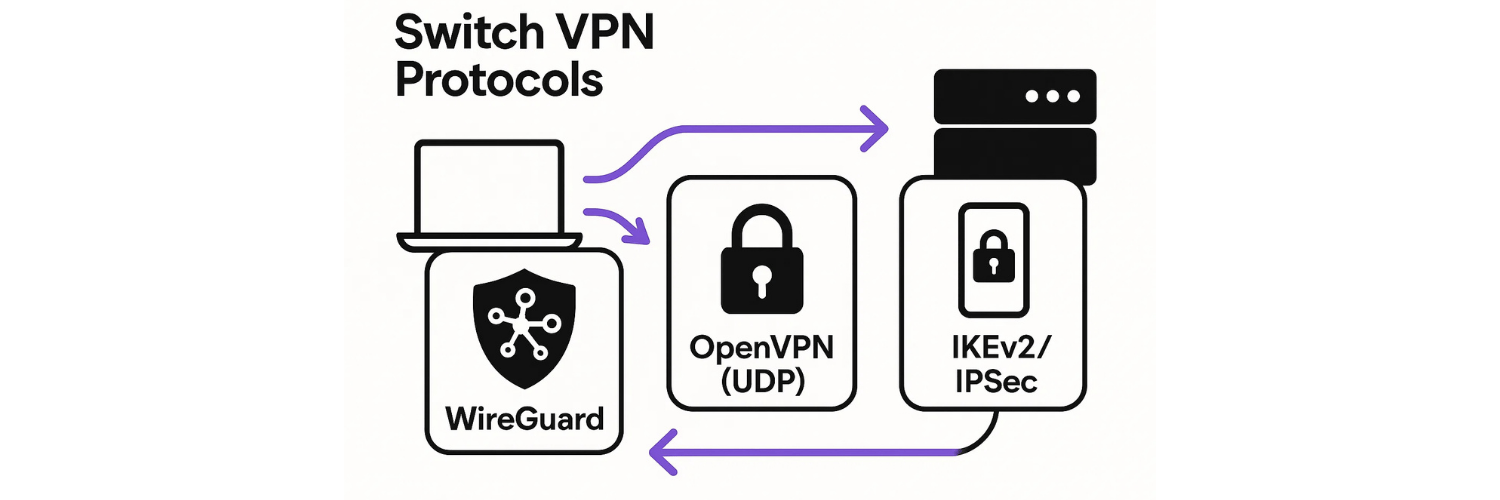
Every VPN relies on a tunneling protocol—the technology that dictates how your data is encrypted and transmitted between your device and the VPN server. Different protocols are designed with different priorities: some maximize security, while others emphasize speed and efficiency. Choosing the right one for your needs can make a noticeable difference in performance.
WireGuard is the newest and most advanced protocol available today. It’s lightweight, efficient, and offers some of the fastest speeds while still maintaining strong encryption. Many VPN providers now use WireGuard as their default because it often cuts latency and improves streaming or gaming experiences.
OpenVPN (UDP) is one of the most widely used protocols. When configured to use UDP (User Datagram Protocol), it offers a strong balance between speed and security, making it a great choice for activities like streaming or downloading large files.
IKEv2/IPSec is particularly well-suited for mobile devices. If you’re switching between Wi-Fi and mobile data, IKEv2 ensures your VPN reconnects quickly without dropping the connection.
Experimenting with these protocols in your VPN’s settings is highly recommended. Some networks or ISPs work better with one protocol than another. For example, if your VPN feels sluggish on OpenVPN, switching to WireGuard could instantly boost your performance.
3. Use a Wired Connection Instead of Wi-Fi
Wi-Fi is convenient, but it isn’t always reliable—especially when you’re relying on a VPN connection. Wireless signals are prone to interference from walls, other electronics, or even nearby networks, and speeds can vary depending on how far you are from your router. On top of that, when multiple devices are connected to the same Wi-Fi, bandwidth is shared, which can slow your VPN connection.
For the most stable performance, use an Ethernet cable to connect your device directly to the router. A wired connection eliminates issues like packet loss, interference, and weak signals, often resulting in much faster speeds and lower latency. Many users report that simply switching from Wi-Fi to Ethernet effectively doubles their VPN speed.
If you’re traveling or can’t access a wired connection, switching your Wi-Fi band can help. Use 5GHz Wi-Fi instead of 2.4GHz for faster speeds and less interference, especially in urban areas where networks are crowded.
4. Restart Your Router and Device
Your router and device are like mini-computers—they build up temporary files, cache, and background processes over time. These can slow down not only your internet connection but also your VPN performance. A sluggish router may cause higher latency, packet loss, or even frequent VPN disconnects.
Restarting your router and device clears out these temporary issues, giving your network a clean slate. This is often one of the simplest yet most effective fixes for sudden drops in VPN speed.
If you notice frequent slowdowns, you can also schedule automatic router reboots during off-peak hours (like late at night). Many modern routers have this feature built-in. By regularly refreshing your connection, you ensure your VPN has a stable foundation to work with, reducing the chance of speed fluctuations.
5. Keep Your VPN App Updated
Like any other software, VPN apps are constantly improved by their developers. Updates often include bug fixes, performance enhancements, and security upgrades that directly impact speed and reliability. Running an outdated version of your VPN client means you might be missing out on optimizations that could make your connection faster.
To avoid falling behind, enable automatic updates on your VPN app whenever possible. It’s also important to keep your operating system and network drivers up to date, since outdated drivers can cause compatibility issues that slow down your connection. By staying current, you ensure your VPN is always running with the latest improvements and maximum efficiency.
6. Avoid Peak Usage Hours
VPN servers, like highways, experience traffic jams during peak hours. When too many users connect at the same time, bandwidth is shared, resulting in slower speeds for everyone. This is especially noticeable in the evenings when people stream movies, play games, or download files.
For smoother speeds, try connecting early in the morning or late at night when servers are less crowded. Some VPNs also offer dedicated servers or premium plans designed to handle heavier traffic. Using these options can help you bypass congestion and enjoy consistent performance, even when the network is busy.
7. Use Split Tunneling

Not all your online activities need to go through a VPN tunnel. This is where split tunneling comes in. It allows you to choose which apps or websites use the VPN and which connect directly to your ISP. By reducing the amount of data routed through the VPN, you free up bandwidth and improve performance for tasks that truly require encryption.
For example, you could use the VPN only for streaming services, banking apps, or work platforms, while everyday browsing and local websites bypass the VPN. This not only speeds up your connection but also gives you more flexibility in balancing privacy and performance.
8. Optimize DNS Settings
Even with a VPN enabled, your device may rely on slow or poorly configured DNS resolvers. A DNS (Domain Name System) translates website names into IP addresses, and if the lookup process is slow, your browsing experience suffers.
To fix this, switch to faster DNS providers like Cloudflare (1.1.1.1) or Google DNS (8.8.8.8). Many premium VPNs also include private DNS servers, which prevent leaks and speed up lookups by keeping everything inside the encrypted tunnel. Optimizing your DNS can significantly improve page load times and overall browsing speed.
9. Upgrade Your Internet Connection
Sometimes, the issue isn’t your VPN—it’s your ISP. If your baseline internet speed is already low, even the fastest VPN can’t make it better. Encryption will always introduce a small drop in performance, which becomes more noticeable when starting from a weak connection.
If you’re consistently struggling with poor speeds, consider upgrading to a faster plan with higher bandwidth. In some cases, switching to an ISP with better international routing can also reduce latency when using VPN servers abroad. This ensures your VPN has a strong foundation to build on.
10. Consider a Premium VPN

While free or budget VPNs may seem appealing, they often come with serious limitations. These can include bandwidth caps, overloaded servers, outdated protocols, and fewer server locations. The result? Slow, unreliable connections that frustrate more than they help.
Investing in a premium VPN service can solve these problems. Premium providers typically offer dedicated infrastructure, faster protocols like WireGuard, unlimited bandwidth, and a wide range of servers worldwide. These advantages translate into higher speeds, better stability, and stronger security. If speed is a top priority, a premium VPN is often the best long-term solution.
Conclusion
A VPN is one of the best tools for protecting your privacy and accessing restricted content, but slow speeds can quickly turn convenience into frustration. The good news is that most VPN speed issues have simple fixes. By choosing the right server, switching protocols, keeping your software updated, and using smart tricks like split tunneling or wired connections, you can dramatically improve your VPN’s performance.
Ultimately, the balance between speed and security depends on your needs. For streaming and gaming, prioritize faster protocols and nearby servers. For sensitive tasks like online banking or work, stronger encryption may be worth a slight speed trade-off. With the right setup—and possibly the right provider—you don’t have to choose between privacy and performance. Instead, you can enjoy a VPN that is both fast and secure, keeping your online experience smooth and protected.
FAQs: Speeding Up Your VPN
1. Why does my VPN slow down my internet?
Because your traffic is encrypted and routed through an extra server, adding latency and reducing raw speed.
2. Which VPN protocol is fastest?
WireGuard is generally the fastest, followed by IKEv2 and OpenVPN UDP.
3. Will using a closer server really help?
Yes. The shorter the distance, the faster the connection due to lower latency.
4. Does split tunneling make my VPN unsafe?
No, but only the apps routed through the VPN remain encrypted.
5. Why is my VPN speed inconsistent?
Server load, peak hours, and ISP throttling all contribute to fluctuating speeds.
6. Can a VPN ever increase my internet speed?
Yes, in rare cases where your ISP throttles streaming or gaming traffic, a VPN can bypass restrictions.
7. How do I test my VPN speed?
Use tools like Speedtest.net with your VPN on and off, then compare results.
8. Is free VPN speed always slow?
Usually, yes. Free VPNs limit bandwidth and server capacity.
9. Should I use TCP or UDP in OpenVPN?
UDP is faster and better for streaming; TCP is more stable but slower.
10. Can upgrading my router improve VPN speed?
Yes. Newer routers handle encryption better and support faster connections.
VPN Speed Test: How to Measure and Understand Your VPN’s Performance
VPN Speed Fluctuations: Why Your VPN Is Fast One Day and Slow the Next
Why Is My VPN Slow? 7 Reasons and How to Fix Them
Fastest VPNs of 2025 (Tested & Ranked)
VPN Protocols Compared by Speed: WireGuard vs OpenVPN vs IKEv2
How VPN Speed Tests Work: Ping, Download, Upload, and Jitter Explained
Why VPNs Slow You Down: Encryption, Routing, and Server Load
VPN Speed vs Security Trade-Off: Finding the Sweet Spot
Tags

About VPNTest
Content Specialist with expertise in cybersecurity and online privacy. Sarah has been testing and reviewing VPN services for over 5 years and regularly contributes to leading tech publications.
View all articles by VPNTest →




Never Miss an Article
Subscribe to our newsletter to receive the latest VPN guides, security tips, and industry news directly in your inbox.